Debugging an externally launched WildFly
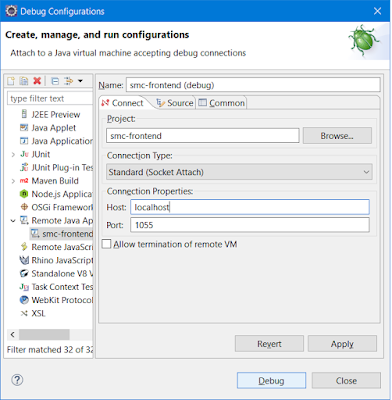
Contents Introduction Prerequisites Remote debugging Introduction WildFly application server is the second most popular Java EE container, so there's a chance that you used it already or you will use it in the near future. One great problem during a delpoyment is when things go wrong in the production environment and you must find out what is wrong with your application. The first thing that comes to your mind is to look through the log files, but what happens when that isn't enough? In the following, i will show you how to run WildFly in debug-mode and how to remote debugging it using Eclipse IDE. Prerequisites IDE: Eclipse IDE for Java EE Developers Java EE container: WildFly 10.x OS: Windows Remote debugging To run WildFly in debug-mode you have to use the following command line: ${WildFlyInstallationPath}\bin\standalone.bat --debug 1044 meaning that it will allow remote debugging on the port specified (you can us...