Posts

Juice this "static" up a little

    Static members and methods are basically the same as a non-static members and methods, but there is one difference: you don't need an instance variable to access them. For example, if you have a static class that is named HelperClass  that has a public method named DoStuff , you call the method as shown in the following example: HelperClass.DoStuff()     For more information about statics see " Static Classes and Static Class Members (C# Programming Guide) ".     The good about statics: single point data manipulation less memory usage (no instances) faster access/call times (the compiler generates overhead for non-static members and methods) low level of code complexity     The bad about statics: statics limitations (no inheritance, no overriding, can't use non-statics, etc.) code rigidity harder to test no control over the life cycle (remains in memory for the lifetime of the application domain) ...
.NET Framework source code debugging

Image
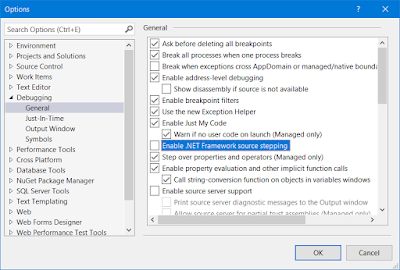
The .NET Framework source code for the targeted version can be downloaded at: http://referencesource.microsoft.com/ from "Download" section. To enable .NET Framework  source code debugging in Microsoft Visual Studio see: https://msdn.microsoft.com/en-us/library/cc667410.aspx Specify which symbols to load: After this, hit "OK" button and proceed with the debugging. Enjoy (ง°ل͜°)ง

Sandboxing with AppDomain

Image
Contents Introduction Prerequisites Sandboxing with AppDomain Putting it all together Introduction In the following, i will show you how to run partially trusted code and avoid polluting main application domain by sandboxing with AppDomain. Prerequisites IDE: Microsoft Visual Studio or Visual Studio Code Sandboxing with AppDomain To understand and apply this, first see: https://docs.microsoft.com/en-us/dotnet/framework/misc/how-to-run-partially-trusted-code-in-a-sandbox In addition to that: communication across application domains is made via a proxy (a class that extends  System.MarshalByRefObject ); modifications on reference type parameters are available across application domains only for ref and out  parameters; CreateInstanceAndUnwrap  rises  AssemblyResolve  events in the application domain from which it was called for the specified assembly (i wasn't expecting that!!!). In the screenshot from above we...

DevTalks Bucharest 2017 review

Image
Dev<Talks/> brings together great community leaders and innovation, this year’s stages featured: Web & Mobile, BigData & Cloud, DevOps, Java, Project Management, smart devices, machine learning, AI and a variety of workshops. This is the 4th edition of Dev<Talks/> Bucharest and it took place in the Romexpo exhibition complex. It started early in the morning, around 9 AM. First I had to register and then get the badge and the agenda for the day (the online version of the agenda:  http://www.devtalks.ro/bucharest/agenda/ ): As I was saying, it was early in the morning and the place was pretty quiet: The agitation began with the opening of the stages. With pretty good timing and with the help of the agenda (it also contained a map) you could have enjoyed all the presentations you desired. The presentations consisted in introductory material and recipes for real-life situations, new approaches in software development and highlighting th...

Network and application monitoring using Zabbix

Image
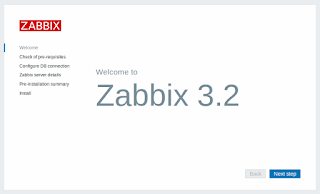
Contents Introduction Prerequisites Zabbix server installation Zabbix agent installation Introduction Zabbix is software that monitors numerous parameters of a network and the health and integrity of servers. Zabbix uses a flexible notification mechanism that allows users to configure e-mail based alerts for virtually any event. This allows a fast reaction to server problems. Zabbix offers excellent reporting and data visualisation features based on the stored data. This makes Zabbix ideal for capacity planning. Zabbix supports both polling and trapping. All Zabbix reports and statistics, as well as configuration parameters, are accessed through a web-based frontend. A web-based frontend ensures that the status of your network and the health of your servers can be assessed from any location. Properly configured, Zabbix can play an important role in monitoring IT infrastructure. This is equally true for small organisations with a few servers and for large companies...

Debugging an externally launched WildFly

Image
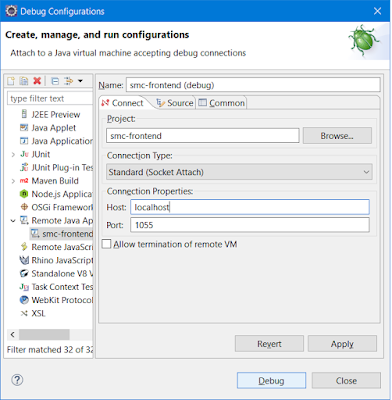
Contents Introduction Prerequisites Remote debugging Introduction WildFly application server is the second most popular Java EE container, so there's a chance that you used it already or you will use it in the near future. One great problem during a delpoyment is when things go wrong in the production environment and you must find out what is wrong with your application. The first thing that comes to your mind is to look through the log files, but what happens when that isn't enough? In the following, i will show you how to run WildFly in debug-mode and how to remote debugging it using Eclipse IDE. Prerequisites IDE: Eclipse IDE for Java EE Developers Java EE container: WildFly 10.x OS: Windows Remote debugging To run WildFly in debug-mode you have to use the following command line: ${WildFlyInstallationPath}\bin\standalone.bat --debug 1044 meaning that it will allow remote debugging on the port specified (you can us...

Building a RESTful API with NancyFx

Contents Introduction Prerequisites The basics of NancyFx Model binding and validation Bootstrapping NancyFx Hosting NancyFx Authentication and security Putting it all together Introduction In the following, I will show you how easy is to build a simple RESTful API with NancyFx. As it is said by its creators "Nancy is a lightweight, low-ceremony, framework for building HTTP based services on .NET and Mono. The goal of the framework is to stay out of the way as much as possible and provide a super-duper-happy-path to all interactions." (the full documentation can be found at https://github.com/NancyFx/Nancy/wiki/Documentation ). To understand and apply this, basic knowledge of C# programming language and RESTful API concepts is required. Prerequisites IDE: Microsoft Visual Studio or Visual Studio Code NuGet packages: https://www.nuget.org/packages/FluentValidation/3.4.0 https://www.nuget.org/packages/Microsoft.Owin/3.1.0 https://www.nuget.org/packa...